

Quality figures explained
Orbit shows many quality figures: pass rate, flaky share, completion, health, readiness. Each one answers one question, over one set of results. This page explains, in plain words, what each figure counts and over which period, so you can tell why the Station can say “all tests passed” while the Console says Watch or Blocked. It ends with a worked example and a list of what to do in common cases.
How it works
Section titled “How it works”Two ways to look at results
Section titled “Two ways to look at results”Every figure uses one of two bases. Most surprises come from comparing a figure of one basis with a figure of the other.
| Basis | The question it answers | Examples |
|---|---|---|
| Latest result | “Where does each test stand now?” Orbit takes the newest result of each test and ignores the older ones. A test that failed on Monday and passed on Tuesday counts as passed. | Station Coverage, cycle completion, Failing now, catalog coverage, failing P1 tests |
| A period | “How did the tests behave over the last days?” Orbit looks at every result in the period. A test that failed on Monday and passed on Tuesday counts as unstable, even though it passes now. | Console Quality › Health, pass rate over 7 days, flaky share, new failures, duration change, risk detection |
A few rules hold for both:
- Days are project days. A day runs from midnight to midnight in the project’s time zone. “Last 7 days” means today and the six days before.
- Only decisive results count as a run. Passed, flaky, failed, timed out and interrupted are decisive. Skipped and not run are not runs.
- Flaky counts as passed in a pass rate. A flaky result is a test that failed and then passed on a retry in the same run.
- Overridden runs are left out. A run where someone changed workers, retries, the time limit or variables for one run does not count in quality figures (see Station run features).
- Invalidated runs and results are left out.
- Quarantined tests are left out and counted separately (see How quarantine changes the figures).
One set of tests per cycle
Section titled “One set of tests per cycle”A release has a scope (the workloads, suites, tags and requirements it covers). Each cycle copies that scope when it is created and keeps it. Every figure of a cycle, on every page, is computed over one set of tests: the tests that are in the newest catalog, on a workload of the cycle’s environment, in the cycle’s scope and in the release scope.
What this means for you:
- “Ran”, “expected”, completion, pass rate, failing now and the gate of one cycle all describe the same tests. “Ran” can never be larger than “expected”.
- A run that belongs to the cycle by time but tests things outside its scope is not added to the cycle figures. The page says so instead of hiding it: “N tests ran in this cycle but are not in its scope, so they are not counted.” (or “…are outside the release scope…”), with a link to fix the scope.
- When someone edits the release scope later, open and planned cycles do not follow on their own. The Release page shows “The release scope changed. N cycles do not follow it yet.” with Apply to cycles (QA Lead or higher).
- In the release Matrix, a release test that is outside the cycle’s scope reads “Not in this cycle”, not “Not run”.
- A closed cycle keeps its numbers as a snapshot. If results, the scope, the catalog or the quarantine list change afterwards, the cycle page says the numbers are live again and why.
The figures
Section titled “The figures”The table lists each figure by the name you see on screen.
| Figure | What it counts | Basis and period | Where you see it |
|---|---|---|---|
| Pass rate | Passed and flaky results divided by all decisive results, pooled over the whole period (not an average of daily rates). | Period: last 7 project days. A cycle uses its own runs; a release gate on an environment uses all cycles of the release there. | Console Quality › Health, Home, sidebar, gates, cycle page. The label names the basis: “Pass rate, 7 days (project days)”, “Pass rate, this cycle”, “Pass rate, all cycles of this release on {environment}”. |
| Pass rate per day | The same, one value per day. | Period: last 30 days, read from the daily summary (“Rollup, includes quarantined tests”). | Quality › Health, trend chart. |
| Flaky share | Tests whose stability is flaky, divided by the tests that ran. | Period: last 7 project days. | Quality › Health, Flaky › Trends, gates. |
| Flaky tests | Tests that were flaky in the period: Playwright reported them flaky at least once, or they ran at least twice and both passed and failed. | Period: last 7 days, or the cycle. | Flaky page, cycle page. |
| Flaky results | Results that failed and then passed on retry. Counts results, not tests. | Period: last 7 days. | Flaky › Trends. |
| New failures, 7 days (project days) | Tests that failed in the period and did not fail in the 30 days before it, on any environment of the project. | Period: last 7 project days, plus the 30 days before. | Quality › Health, Home, Station Insights, environment gates. |
| New in this cycle | Tests failing now in the cycle that were not failing at the end of the previous cycle of the same release and environment. Without a previous cycle, every failing test counts and the figure says “no previous cycle”. | The cycle, against the end of the previous cycle. | Cycle page, release Cycles tab, release gate, Station Release card. |
| Persistent failures (Tests failing 3+ runs in a row) | Catalog tests whose latest 3 or more results in a row all failed, and that ran in the period. | Streak over the last 30 days; the test must have run in the last 7 days. | Quality › Health, gates. |
| Failing now | Tests whose latest result in the cycle failed, timed out or was interrupted. | Latest result in the cycle. | Cycle page, Home. |
| Failing P1 tests | P1 tests whose latest decisive result failed. | Latest result in the last 30 days (or “Failing P1, this release”). | Quality › Health (P1 tests check), gates, Release card. |
| P1 tests not run | P1 catalog tests with no result at all. | Last 30 days. | Quality › Health (P1 tests check), Station Coverage. |
| Duration change | The median daily average test duration of the period compared with the last 30 days, in percent. | Period: last 7 days against 30 days. | Quality › Health, Quality › Performance. |
| Cycle completion | Tests of the cycle’s set that have at least one decisive result in the cycle, divided by all tests of the set. | Latest result in the cycle. | Station Coverage (Cycle completion), cycle page, release gate. |
| Results in this cycle | The latest result of each expected test: passed, flaky, failed or not run yet. | Latest result in the cycle. Without a cycle on the environment: the last 30 days (“Results in 30 days”). | Station Coverage. |
| Catalog coverage | Catalog tests whose latest decisive result passed, divided by all catalog tests. | Latest result in the last 30 days. | Console Quality › Coverage, gates. |
| Requirement coverage | Active requirements whose linked tests all passed on their latest result, divided by all active requirements. | Latest result in the last 30 days (project), or in the release’s cycles (release). | Requirements, release gate. |
Health and its five checks
Section titled “Health and its five checks”Quality › Health gives one verdict for the last 7 project days. The verdict is the worst of the five checks. One check on Watch is enough to make the whole project Watch, even when the four others are Healthy.
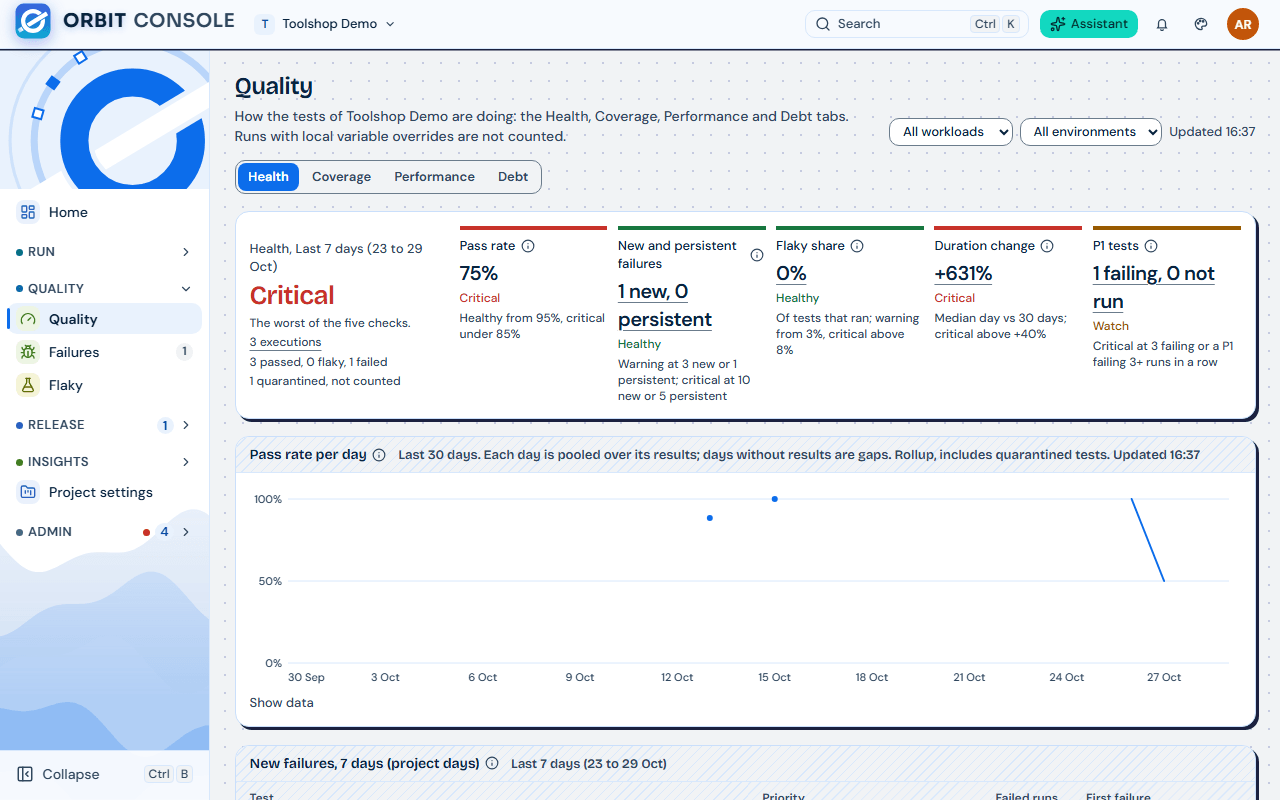
| Check | Watch when | Critical when |
|---|---|---|
| Pass rate | under 95% | under 85% |
| New and persistent failures | 3 or more new failures, or 1 or more persistent failures | 10 or more new failures, or 5 or more persistent failures |
| Flaky share | 3% or more | above 8% |
| Duration change | above +15% | above +40% |
| P1 tests | 1 or 2 failing P1 tests, any P1 test not run in 30 days, or any test failing 3 or more runs in a row | 3 or more failing P1 tests, or a P1 test failing 3 or more runs in a row |
A check with no value (no test ran, no duration history) shows No data and does not count. When there is no pass rate at all, the whole verdict is No data.
The checks use the whole project, or the workload and environment you pick at the top of the page. The Station Coverage page always shows one environment.
Every environment is checked automatically for risks over the last 7 days. A finding becomes a Proposed risk. A proposed risk never counts until a QA Lead Accepts it; it can also be dismissed.
| Finding | Level |
|---|---|
| “N P1 tests failing persistently” (3 or more failures in a row) | Critical |
| “N P1 tests flaky” | High |
| “Suite …: N tests failing persistently” (3 or more tests in one suite) | High |
| “N tests failing with the same error” (P1 or P2 tests among them, still failing) | High from 3 tests, else Medium |
| “Flaky tests at N%” (flaky share above 8%) | Medium |
| “Tests running N% slower” (duration change above +40%) | Medium |
When the condition goes away, a proposed risk is withdrawn on its own. An accepted risk is not closed on its own: it shows Condition no longer seen, and a person sets its status to Mitigated or Closed.
Release readiness
Section titled “Release readiness”The Readiness tab of a release shows a verdict at the top:
| Verdict | Meaning |
|---|---|
| Blocked | At least one item is listed under “N things block this release”. |
| In progress | Nothing blocks, but the release is not ready for release yet. |
| Ready | Nothing blocks and the release is ready. |
| Ready with risks | Ready, but the latest readiness assessment found open risks or gate warnings. |
Items that block a release include:
- Cycles: “N of M cycles are not closed”. A cycle closes when someone chooses Close cycle now, or when its end date passes.
- Decision: “No decision since the last cycle closed”, or “The latest decision is hold”.
- Approvals and required Checklist items that are not done.
- Gate: “The gate fails on {environment}”.
- Failures: open P1 failure groups that touch tests in scope.
- Risks: “N open high or critical risk(s)”. Only accepted risks with status Open or Acknowledged count. Medium risks do not block; they turn a ready release into Ready with risks.
- Environment: a sign-off environment that is down.
- Requirements: requirements in scope that are failing or have no test.
The readiness assessment lists its reasons in words, for example “open high risk: 1 P1 test flaky”.
How quarantine changes the figures
Section titled “How quarantine changes the figures”A quarantined test still runs (in shadow mode) but does not count. Orbit reads the current quarantine list every time it computes a figure.
- A quarantined test is left out of both sides of every quality figure: pass rate, failing now, failing P1, new failures, persistent failures, flaky share, flaky tests, completion and the cycle’s expected tests.
- It is counted separately, next to the figure: “N quarantined, not counted”.
- It never proves a requirement.
- Risk detection ignores it, so a “P1 test flaky” proposal for it is withdrawn. An accepted risk only shows Condition no longer seen.
- When the test is released, all its results in the period count again, including the ones from while it was quarantined. Figures can move on that day.
- Charts over 30 days and longer come from the daily summary and still include quarantined tests. They say “Rollup, includes quarantined tests”.
- Test debt still counts quarantined tests: they are the debt.
Quarantine needs the QA Lead role. Choose the tests on the Flaky page and choose Quarantine, give a reason and an end date. Stations pick up the change within 5 minutes. A test is released automatically once it passes enough runs in a row (a project setting).
Known flaky (QA Engineer) is different: it only takes the test out of the Flaky queue. The test still counts in the flaky share and in risk detection.
Worked example
Section titled “Worked example”The demo project “Toolshop Retail” has release 4.2 with two cycles on the staging environment. Everyone on the team sees a different picture:
- Station Coverage, Cycle 2: Cycle completion 100%, Results in this cycle: all 29 tests passed.
- Console Quality › Health: Watch.
- Console release 4.2, Readiness: Blocked, “2 things block this release”.
- The latest readiness assessment lists “open high risk: 1 P1 test flaky”.
All four are correct. They answer different questions.
- Coverage looks at the latest result. In Cycle 2, the newest result of each of the 29 tests passed. Earlier failures in the cycle do not change that.
- Health looks at the last 7 days. One P1 test, “Checkout with gift card”, failed on Tuesday and passed on the retry. That result is flaky. Over the 7 days, 1 of 31 tests that ran was flaky: a Flaky share of 3.2%. The check turns Watch from 3% (and Critical only above 8%). The other four checks are Healthy, but the verdict is the worst check, so the project reads Watch.
- Risk detection saw the same flaky P1 test and proposed “1 P1 test flaky”, level High. A QA Lead accepted it, so it is an open high risk.
- Readiness lists what blocks the release: “Cycles: 2 of 2 cycles are not closed” and “Risks: 1 open high or critical risk”. Either one alone is enough for Blocked.
What the team does:
- Open Flaky in the Console. The queue lists “Checkout with gift card” first (P1 tests come first). Use Investigate to look at its runs.
- Then choose one:
- Fix the test (or the product) and run it again. The flaky result stays in the 7-day window until it is older than 7 days; Watch clears by itself as clean runs push it out.
- Quarantine the test (QA Lead) if the fix will take time. It leaves the flaky share at once, and the risk detection stops seeing it.
- Open Risks and gate and decide the risk: set it to Mitigated or Closed with a note once the test is fixed or quarantined. An accepted risk does not close on its own.
- When testing is done, open each cycle and choose Close cycle now (QA Lead), or let it reach its end date.
- Record a Proceed decision on the release. The verdict moves to Ready (or Ready with risks if medium risks remain open).
What it means for you
Section titled “What it means for you”What to do when…
Section titled “What to do when…”| You see | Why | What to do |
|---|---|---|
| Station Coverage is 100% but Health says Watch | Coverage uses the latest result; Health uses every result of 7 days. A test that failed and then passed still counts in the 7 days. | Open the Health check that is not Healthy. Its value and rule say what tripped it. |
| Flaky share is on Watch | 3% or more of the tests that ran in 7 days were flaky. | Work the Flaky queue: fix, quarantine or mark Known flaky (the last one does not change the share). |
| Pass rate dropped after a quarantine was removed | A released test counts again with all its results in the period. | Expected. Check that the test passes now. |
| Pass rate rose after a quarantine | Quarantined tests leave the figure. | Expected. The note “N quarantined, not counted” says how many. |
| The release is Blocked by “cycles are not closed” | The release waits until every cycle is closed. | Close each cycle with Close cycle now when its testing is done. |
| The release is Blocked by a risk | An accepted risk of level High or Critical is Open or Acknowledged. | Fix the cause, then set the risk to Mitigated or Closed. |
| A risk shows Condition no longer seen | The automatic check no longer finds the problem. | Close the risk if you agree. It still counts until you do. |
| A cycle shows “N tests ran in this cycle but are not in its scope” | Runs in the cycle tested suites outside the cycle’s scope. | If they belong in the cycle, edit the cycle scope; otherwise ignore the note. |
| “The release scope changed. N cycles do not follow it yet.” | The release scope was edited after the cycles were created. | Choose Apply to cycles (QA Lead) to give open and planned cycles the new scope. |
| New failures differ from New in this cycle | They answer different questions: new in the last 7 days against 30 days before, or new against the previous cycle. | Read the label: it always names its basis. |
| A figure says No data | No decisive result in its period or cycle. | Run the tests, or pick a longer period or another environment. |
Read the label
Section titled “Read the label”Every figure that could be read two ways carries its basis in its label or its tooltip, in the same words on the Console and the Station: “7 days (project days)”, “this cycle”, “all cycles of this release on {environment}”, “last 30 days”. Choose the info icon next to a figure for “How is this computed?”. When two numbers seem to disagree, compare their labels first.
Related guides
Section titled “Related guides”- Station run features: run options, and why an overridden run does not count.
- Import requirements from a CSV file: requirements behind requirement coverage.
- People and roles: which role can quarantine, accept risks and close cycles.